Description
Game Introduction
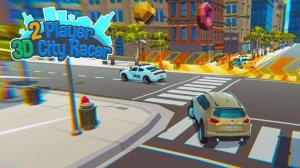
Urban Drive 3D City Racing is a driving and exploration game that places you behind the wheel in detailed 3D city environments. The core objective is to drive through iconic urban landscapes, either racing against a friend or simply cruising for fun. This game stands out by focusing on relaxed exploration and friendly competition, removing time limits and damage penalties to create a stress-free experience. It is designed for all ages, offering a safe and enjoyable digital playground where the joy of driving is the main attraction. The game encourages players to discover shortcuts, enjoy scenic routes, and appreciate the visual details of each city. Whether you prefer a casual drive or a lighthearted race, this game provides a welcoming atmosphere for everyone.
How to Play
To play, you first choose a vehicle and a city to explore. In a typical two-player setup, one player uses keyboard arrow keys to accelerate, brake, and steer, while the second player uses a separate set of keys or a gamepad. The goal is to race against your friend or drive freely through the open map. You can navigate streets, discover shortcuts, and enjoy the scenery. Controls are simple and intuitive, allowing you to start driving immediately without needing to learn complex instructions. The game supports local multiplayer on the same screen, making it easy to play with family or friends.
Game Features
This game includes exciting two-player local multiplayer on the same screen, allowing friends or family to play together. It features detailed 3D city environments inspired by real-world locations, providing a visually engaging backdrop. The gameplay is stress-free, with no time pressure or crash penalties, making it accessible to players of all skill levels. Simple controls and vibrant, family-friendly graphics create a positive and welcoming atmosphere for everyone. The game also includes an open map for free exploration, encouraging players to discover hidden routes and enjoy the scenery at their own pace.
Tips for Success
To get the most out of your experience, take time to explore each city and learn its layout, as discovering shortcuts can give you an edge in races. Practice using the controls smoothly to improve your handling around corners. Communicate with your co-player to coordinate moves during head-to-head races. Most importantly, focus on having fun and enjoying the scenic routes, as the game is designed for relaxed play rather than high-stakes competition.